Let's walk through it.
You're only five steps away from better documentation
%20(2).png?alt=media&token=071f2c7c-3183-418d-9d51-361a44e1221a)
1/ Scan the sticker
Open the camera on your phone and scan the QR code, and enter the access code to gain access to your online circuit directory.

2/ Build the panel
Each online directory starts empty. You add breakers one at a time. This allows complete customization to match exactly what your panel has.
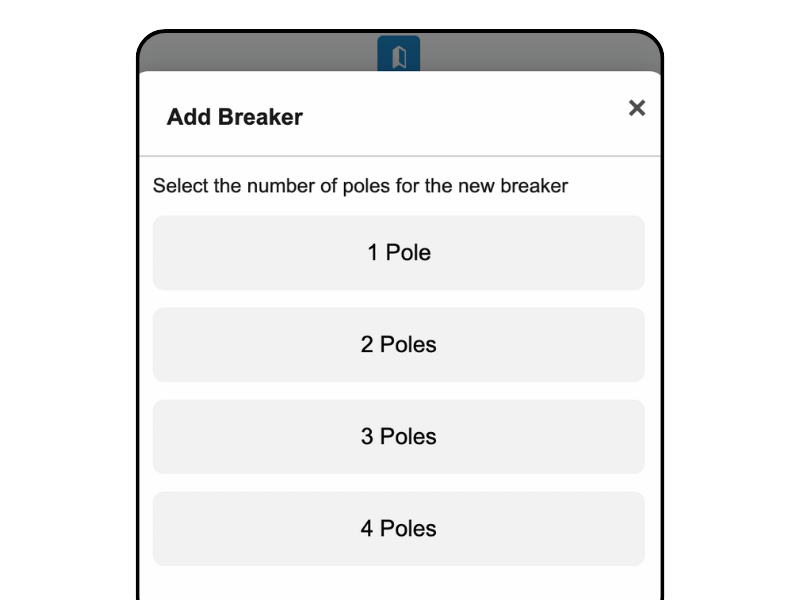
3/ Add & View General Panel Info
Information about the panel itself — separate from individual breakers. Give the panel a name. How many amps? Main panel or sub panel? What's the disconnect type?
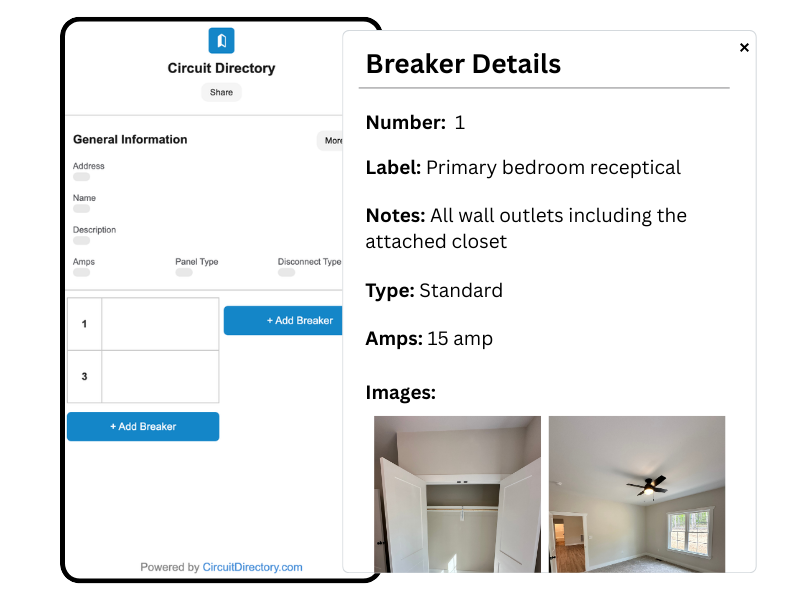
4/ Add & View Breaker Info
Each breaker gets a name, description, breaker type, and amp rating. The description is where you finally have room to explain exactly what's on that circuit.
5/ Capture Images
Take photos or add them from your camera roll. Everything is shown in the Image Gallery by default. Use annotations to add text and drawings.
.png?alt=media&token=3a3968b9-48be-49df-886d-1171925dd659)
Try it out - Live Demo
Not sure if Circuit Directory is the right fit? Try our demo panel.
Try live demo →
Sticker In The Panel
You Own Online Directory
Questions about pricing
- Do I need an account to use the free plan?
- Yes, a free account is required to manage your panel directory. Signing up takes less than a minute.
- What is White Label Branding?
- White Label Branding removes Circuit Directory branding from your panel pages and lets you display your own company name and logo instead.
- Can I upgrade or downgrade my plan at any time?
- Yes. You can upgrade instantly and your billing will be prorated. Downgrades take effect at the end of your current billing period.
- What happens to my panels if I cancel?
- Your panels stay live on the free tier (up to 1 panel). Additional panels will be archived and can be restored if you resubscribe.